Overview of Tosca ANSA® environment | ||
| ||
The graphical user interface supports
- function based definition of the optimization task (preprocessing)
- check run to review completeness and correctness of the definitions
- start of the optimization
- visual postprocessing with Tosca Structure.view
- result transfer for CAD and postprocessors
- validation run for optimization results.
In the following figure the Optimization Task is shown in the Task Manager window of Tosca ANSA® environment
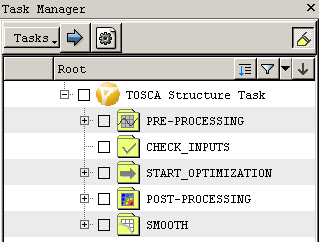 |
One big advantage over the classical workflow with Tosca Structure.gui is the possibility to perform geometric definitions (like design variable constraints or group selection) interactively. Further, consistency checks and updates of all dependencies are performed for each step. At the end of a topology optimization the modified model with all boundary conditions and load cases can be prepared automatically for the validation run.
Tosca ANSA® environment can be started with the command tosca_ansa_env in a SIMULIA Tosca Structure command shell. The start script can be found in <install_dir>\bin\tosca_ansa_env.