Testing the Optimization Process | ||
| ||
Test Level 1
Test level 1 is called using the command
tosca job_name --type test1
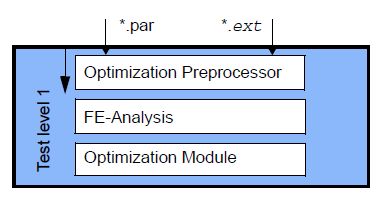
For the first test level, it is required that the following files exist:
- a complete file with the commands for the optimization preprocessor (*.par).
- a FE model (*.ext), that can be loaded in the optimization preprocessor using the command FEM_INPUT.
The optimization is stopped after the optimization preprocessing is finished and the database for the optimization has been created. The directory jobname is created containing all files needed for loading of the input files and creating the Tosca Structure database.
If the test run has been finished correctly (output TOSCA job finished), it means that the syntax of all necessary parameters is correct. If any parameter is not defined correctly, this is logged as ERROR in TOSCA.OUT file located in TOSCA_POST directory. The relevant comments can be found there. The optimization will be stopped because of this.
In shape optimization, all restrictions can be checked using the TEST_SHAPE command, which applies a virtual optimization displacement to the design area.
In bead optimization, all restrictions as well as the direction of the resulting beads can be checked using the TEST_BEAD command.
 |

Test Level 2
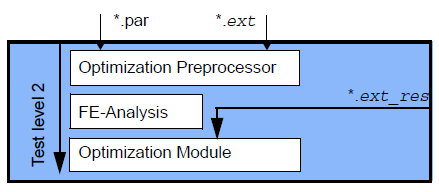
Test level 2 requires not only the files *.par and *.ext (as in test level 1), but also the result file from a separate analysis produced by the relevant solver. This file is saved in the start directory of the optimization job. The result file must contain all the results needed for the optimization.
| Important:
This test level is not available for sensitivity based topology optimization. |
In this test level, the first optimization step is carried out without a FE analysis. The existing result file is copied to the working directory from the start directory.
The optimization is stopped after the optimization module has been called once and a modified analysis model for the relevant solver has been created. The first optimized model, derived from the optimization model and the analysis of the initial design, is generated with low CPU time. As no FE analysis is carried out at this test level, a saving of 70% to 90% in CPU time is achieved compared with the time needed for a single optimization loop including a FE analysis of large models.
 |
In this way, several variations can be tested effectively (e.g. different parameter files such as file1.par and file2.par) using an analysis model with the respective result file before the “real” optimization is started:
tosca job_name --type test2 --opt file1.par
tosca job_name --type test2 --opt file2.par
Test Level 3
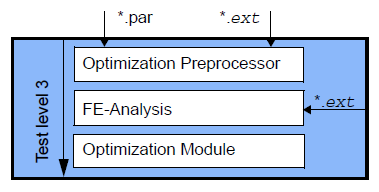
No finite element analysis has to be completed previously in test level 3. After the evaluation of the parameter file (*.par) and the finite element model by the optimization preprocessor, the analysis file is calculated by the FE solver.
When a modified analysis model has been generated from one evaluation of the preprocessing results and the FE results, the optimization is stopped. The modified analysis model is not analyzed by the finite element solver at this test level.
 |
A possible call could be as follows:
tosca job_name --type test3
Important:
|
Test Level 4
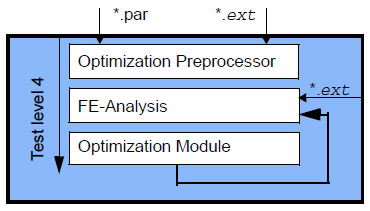
Test level 4 is an extension of test level 2. A result file must exist in the start directory of the optimization job. This result file must contain all results needed for the optimization.
In test level 4 and during the first iteration, the present result file is copied to the working directory. The optimization continues as normal until convergence has been achieved or a stop condition has been met.
Using this test level, the finite element analysis performed in the first iteration of an optimization can be reused for a completely different optimization performed on the same model. Because the results of the initial model are always the same, the same result file can always be used and does not need to be re-calculated each time.
A possible call could be as follows:
tosca job_name --type test4
 |