Script Entry Points | ||
| ||
List of Script Commands and Their Function
| Name of the script command | Function |
|---|---|
| pre_prep | Execution of a script before starting the Tosca Structure.pre TOSCA_PREP |
| post_fem2onf | Execution of a script after the conversion of FE input to ONF (Optimization Neutral Format) file (fem2onf) |
| post_prep | Execution of a script after Tosca Structure.pre TOSCA_PREP |
| pre_fem_modif | Execution of a script before starting modification of finite element input file |
| pre_fem_modif_matrix | Execution of a script before starting modification of finite element input file in matrix step |
| post_fem_modif | Execution of a script after finishing modification of finite element input file |
| post_fem_modif_matrix | Execution of a script after finishing modification of finite element input file in matrix step |
| pre_solver | Execution of a script before each finite element solver run |
| pre_solver_matrix | Execution of a script before each finite element solver matrix run |
| post_solver | Execution of a script after each finite element solver run |
| post_solver_matrix | Execution of a script after each finite element solver matrix run |
| pre_res2vtm | Execution of a script before starting SIMULIA Tosca Structure result interface |
| pre_res2vtm_matrix | Execution of a script before starting the SIMULIA Tosca Structure result interface in matrix step |
| post_res2vtm | Execution of a script after finishing SIMULIA Tosca Structure interface |
| post_res2vtm_matrix | Execution of a script after finishing the SIMULIA Tosca Structure result interface in matrix step |
| pre_life2vtm | Execution of a script before reading the durability results. |
| pre_life | Execution of a script before each durability solver run |
| post_life | Execution of a script after each durability solver run |
| pre_opt | Execution of a script before starting the SIMULIA Tosca Structure optimization TOSCA_OPT |
| pre_matrix | Execution of a script before starting the TOSCA_OPT matrix step |
| post_opt | Execution of a script after the SIMULIA Tosca Structure optimization TOSCA_OPT |
| post_matrix | Execution of a script in the end of a matrix step, after TOSCA_OPT |
| post_eval | Execution of a script after SIMULIA Tosca Structure optimization |
| pre_report | Execution of a script before Tosca Structure.report |
| post_report | Execution of a script after Tosca Structure.report |
| pre_smooth | Execution of a script before Tosca Structure.smooth |
| post_smooth | Execution of a script after Tosca Structure.smooth |
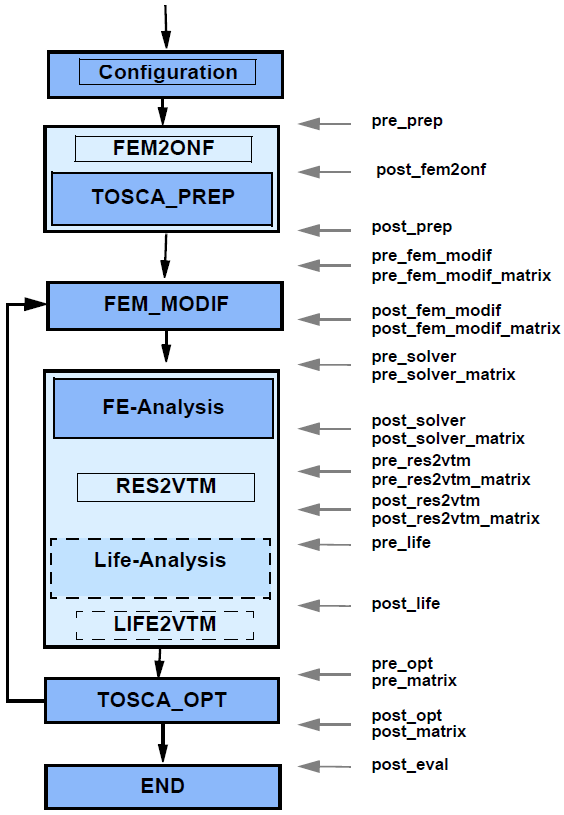
Scripting entry points in SIMULIA Tosca Structure are shown in the below figure.
 |
The user may specify an absolute or relative path to a script that is located in the network. Note that, if relative paths are used, the execution directory is always the working directory of SIMULIA Tosca Structure. All user scripts hooks like pre_prep accept _add_call after the hook name. This means the scripts should contain only the script name with or without leading path. Parameters submitted to the user script are added in the _add_call definition:
 $pre_prep = "pre_prep_script.pl";
 $pre_prep_add_call = "1 2 argument3";
The user may also specify command line calls directly using Perl variables in scripts. On Linux systems, one has to be careful to set the command in quotes in order to avoid problems with the blanks in the command line definition. As the script entry variables are defined in the Perl command syntax of the configuration, the command line has to be additionally set between \" signs. Example:
${pre_prep} = "\" echo just before TOSCA_PREP \"";
Note, that:
- It is not possible anymore to have in the definition of the hook the script name and the parameters, what was possible in versions prior 7.2. If the old behavior is used an ERROR message is thrown informing that the format has changed.
- If multiple commands have to be specified in command line, they all have
to be set in one script definition. This is realized differently on Linux and
Microsoft Windows systems.
Multiple command in one single command line on Linux platforms:
separate commands with semicolon:
echo contents of actual directory ; ls -la
Multiple command in one single command line on Microsoft Windows platforms: separate commands with ampersand:e: & cd work\tosca & dir

Adding Files to the Working Directory
An often needed functionality is to have the script files or other files copied into the working directory. The most simple way is to use the FEM_INPUT command COPY_FILE:
FEM_INPUT
 ID_NAME = fem_input
 FILE = my_solver_file.ext
 COPY_FILE = file1.ext
 COPY_FILE = file2.ext
END_
The same can be done directly in your configuration using
add_files_to_work_dir("file1.ext","file2.txt");
In both cases file1.ext and file2.ext must exist in the starting directory and
both files are copied into the working directory right after starting SIMULIA Tosca Structure.