Configuration | ||
| ||
Configuration Files
The configuration files are loaded in the following sequence:
- System settings (lowest priority)
- User-specified settings
- Model-specific settings
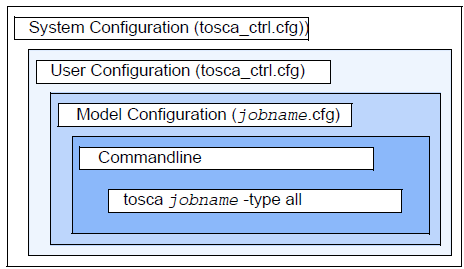 |
Note, that:
-
The current settings of the environment variables can be checked using the
command:
tosca -helpand then choosing the heading ’Information about the SIMULIA Tosca Structure configuration. Before starting the program, the system settings are loaded. During installation of the optimization program system, the settings for the variables used to control the optimization call are made and saved in the file:$tosca/bin/tosca_ctrl.cfgThe system configuration file tosca_ctrl.cfg must contain all necessary environment variables. -
The configuration file is written completely in Perl syntax. If you change the
configuration file, take care to follow Perl syntax.
Each user has the possibility to create a user-specific configuration file in
his home directory. Usually user-specific details (e.g. the scope of type of
data back-up during optimization and search paths for macros) are set. The
file is automatically loaded by SIMULIA Tosca Structure before the control program is
called in case that the file
$HOME/tosca_ctrl.cfgexists. Definitions of job-specific parameters in SIMULIA Tosca Structure parameter file (CONFIG command) are extracted automatically to the file <jobname>.par_cfg in the start directory. Options set with the call of the control program have the highest priority. Usually, the job name and job type are determined here. - The file tosca_ctrl.cfg in the $tosca/bin directory of SIMULIA Tosca Structure installation should not be modified. If a modification should be necessary, a backup of the original configuration file should be kept.
- A user configuration file may easily be generated by copying the configuration of the SIMULIA Tosca Structure installation into the user’s home directory and modifying the file.
- The environment variable $HOME must exist if SIMULIA Tosca Structure is going to use user defined configuration settings.

Environment Variables
Tosca Structure uses and sets several environment variables during the optimization. Some can be configured by the user (either in the installation process, directly using standard operating system procedures or via Tosca Structure configuration files. Internal variables cannot (should not) be set or changed manually.
| Configurable environment variables | Description |
|---|---|
| tosca |
Installation directory of Tosca |
| FED_LICENSE_SERVER_TYPE |
Set the licensing type for SIMULIA Tosca Structure Supported values are:
FED_LICENSE_SERVER_TYPE=<type> |
| FED_DSLS_LICENSE_CONFIG |
For DSLS: Path of the license server config file for DSLS If not set the default location for the license file is used FED_DSLS_LICENSE_CONFIG=<license file path> |
| FED_DSFLEX_LICENSE_CONFIG |
For DSFLEX: License path of the used SIMULIA FlexNet license server FED_DSFLEX_LICENSE_CONFIG=<port>@<hostname> |
| FED_LICENSE_FILE |
For FLEX: License path of the used legacy FlexNet license server FED_LICENSE_FILE=<port>@<hostname> |
| FED_ACADEMIC |
Activate the usage of educational licenses for SIMULIA Tosca Structure. Only supports DSLS licenses FED_ACADEMIC=TEACHING |
| SMA_TSO_TOSCA_SERVER_OPTIONS |
Command line options for the licensing system |
| ANSA_SRV |
License server for Tosca ANSA® environment |
| ANSWAIT |
Set to 1 for Ansys to wait for license, see documentation |
| home |
User configuration directory |
| vtm_cache_size |
Cache in MB (default size:1024 MB) |
| List of Internal Variables |
|---|
| FED_PRODUCT (TSTRUCT) |
| COMMON_ENV__ |
| TOSCA_OSDIR |
| ORIG_DEFAULT_LIB |
| LD_LIBRARY_PATH |
| COMMON_ENV_REPLACE__ |
| fem2onf |
| tosca_interface |
| life_interface |
| tosca_size |
| FED_ASSERT_DEBUG |
UNC Paths
Whenever you have to provide a path in one of the configuration files, you might use UNC paths. But be careful to use forward slashes "/" instead of backward slashes. Example:
//server_resource/folder/executable